How to play Fishin' Frenzy on mobile — safely
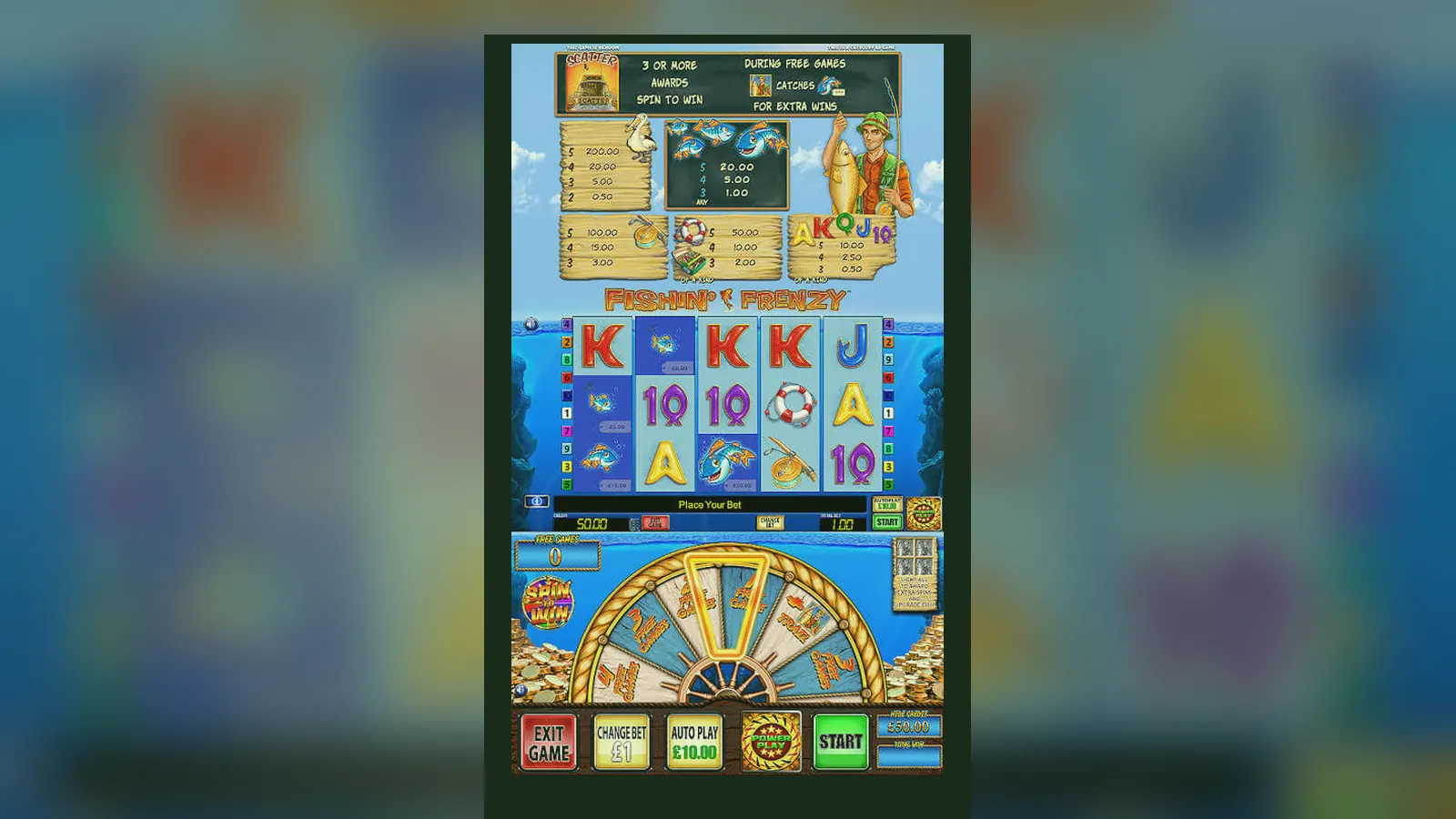
There isn't a standalone Fishin' Frenzy app in the Play Store or App Store. The game runs inside casino operator apps or as a browser bookmark saved to your home screen. Both work the same once you're in — same reels, same £5 stake cap, same free-spins trigger — but the install path and what you hand over in permissions are very different.
This page walks through what you'll see on each screen of the mobile interface, how the four install routes compare, what a legitimate operator app asks for versus a dodgy APK, and the phone requirements that matter. If you've played the desktop version, the layout shrinks but the game doesn't change; if you haven't, the mobile view is where most UK players meet it first.
The store card you won't find — and the details that would be there
Blueprint Gaming doesn't publish a Fishin' Frenzy app under its own name. The game appears inside operator apps, so there's no single store listing. If there were, here's what the details would look like — useful for comparison when you're checking an operator's casino app or deciding whether a standalone APK is legitimate.
The absence of a standalone Fishin' Frenzy app is normal for slots. Operators bundle dozens of games into one app, and Blueprint pushes updates to the game logic on its servers without touching your phone's storage. If you see a standalone Fishin' Frenzy APK for download outside an operator's site, it's either a demo wrapper or a clone — more on spotting fakes below.
Four ways to install — browser, shortcut, operator app, APK
Each path gets you to the same game, but the install steps, what gets saved to your device, and the risk profile differ. Here's how each one works.
- Browser play (no install): Open the operator's site in Safari or Chrome, log in, search for Fishin' Frenzy, tap Play. The game loads in an iframe. Nothing is installed; the session lives in your browser cache. Stake caps, balance and GAMSTOP blocks apply as normal. Risk: low — you're on the operator's UKGC-licensed domain, visible in the address bar. The downside is you'll need to log in each visit and navigate to the game manually.
- Add to home screen (web app): Same as browser play, but after loading the game once, tap Share (iOS) or the three-dot menu (Android) and choose «Add to Home Screen». Your phone saves a shortcut with the operator's icon. Next time you tap it, the game opens in a chromeless browser window that feels like an app. Risk: low — it's still the operator's site, just bookmarked. Permissions: none beyond what the browser already has. This is the method most UK players use when they want quick access without installing a full app.
- Operator casino app (Play Store / App Store): Download the operator's app from the official store. The app bundles Fishin' Frenzy along with other slots, live casino, and account tools. Once installed, open the app, log in, find Fishin' Frenzy in the slots library, and tap Play. Risk: low if the app is published by a UKGC-licensed operator and downloaded from the official store. Check the developer name matches the operator and the licence number in the app's footer matches the UKGC register. Permissions: the app will ask for notifications (bonus alerts), camera (for document uploads during KYC), and sometimes location (to confirm you're in the UK). These are standard for a casino app. The app takes 80–120 MB of storage.
- APK sideload (Android only, high risk): An APK is an Android app file downloaded from a website instead of the Play Store. To install it, you enable «Install from unknown sources» in your phone's settings, download the APK, and tap the file to install. Risk: high. Legitimate operators don't distribute casino apps as APKs because Google Play is available in the UK for gambling apps. An APK that claims to be Fishin' Frenzy or an operator's app is either outdated, unofficial, or malicious. Even if the game works, you're handing permissions to an unverified file. Red-flag permissions: SMS access (for intercepting two-factor codes), contacts, call logs, or «install other apps». If the APK asks for these, delete it. The only safe APK scenario is if the operator's own site offers it as a mirror for users who can't access the Play Store — and even then, check the domain carefully.
What you see once the game loads: five screens and what each one does
The mobile interface condenses the desktop layout into a portrait view. Here's what appears on each screen and how you move between them.
Main game screen: The five reels fill most of the display, with the fisherman to the left and a rippling water backdrop. At the bottom, three controls sit in a row: stake selector (tap to open a menu of values from £0.10 to £5.00, or £2.00 if you're 18–24), Spin button (green circle, centre), and Autoplay (opens a submenu where you pick 10, 25, 50 or 100 spins and set a single-win or loss limit). Your balance appears in the top-left corner in pounds and pence. The paytable button (three horizontal lines or an «i» icon) sits in the top-right. Tap it to see symbol values, free-spins rules, and the RTP figure (usually 96.00% for the UK version, though some operators run the 94.00% or 92.00% variant — check before you play).
Paytable and rules: Swipe up or tap through tabs. The first screen lists symbol payouts for three, four, and five of a kind. The fisherman is the wild and the highest-value symbol. The second screen explains the free-spins trigger (three or more scatter fish) and how the fisherman collects prizes during the bonus. The third screen gives the RTP, hit frequency, and maximum win (usually capped at £250,000 or 5,000× stake, whichever is lower, on UKGC sites). Some versions add a fourth tab with game history — your last 50 spins, timestamps, and results. Close the paytable by tapping the X or swiping down.
Settings menu: Tap the gear icon or hamburger menu. Options include sound on/off, spin speed (normal, fast, turbo), and whether to show the win animations. On operator apps, this menu also links to your account, deposit page, and responsible-gambling tools (deposit limits, session reminders, self-exclusion via GAMSTOP). Some apps let you switch to demo mode from here without leaving the game screen.
Deposit and cashier: If you're on an operator app, tapping your balance or a «Deposit» button opens the cashier in a WebView or separate screen. You'll see payment options (debit card, PayPal, Apple Pay, Open Banking), recent transactions, and any active bonus with its wagering progress. Deposits from £10.00 are typical; the maximum depends on your account's affordability check status (£150 net deposits a month trigger the first stage). Withdrawals go to the same screen. E-wallets and Faster Payments clear in hours to two days; the first withdrawal takes longer because the operator checks your ID documents.
Game history and session log: Most operator apps include a «My Bets» or «History» section outside the game. It lists every spin with the stake, result, timestamp, and a replay button. UK regulations require this data to be available for at least six months. If you're chasing a win through free spins or checking how much you've spent in a session, this log is more detailed than the in-game summary.
Phone requirements: what you need to run it smoothly
Fishin' Frenzy is an HTML5 slot, so it runs in a browser or WebView rather than as native code. The hardware bar is low, but some older devices struggle with the animations during free spins.
- Operating system: iOS 13 or later, Android 8.0 (Oreo) or later. Older versions may load the game but can't guarantee security patches for payment handling.
- Screen size: Technically playable on anything from a 4-inch screen upward, but the controls get cramped below 4.7 inches. A 5.5-inch or larger display is more comfortable for longer sessions.
- RAM: 2 GB minimum, 3 GB recommended. The game itself uses around 150 MB of memory, but operator apps bundle other features that add overhead.
- Storage: 80–120 MB for the operator app if you install one; the web app version (add to home screen) uses only browser cache, typically 15–20 MB.
- Connection: A stable 3G connection is enough for gameplay, but 4G or Wi-Fi is better when depositing or withdrawing to avoid timeouts during payment processing. The game itself streams reel positions and outcomes from Blueprint's servers, so a dropped connection mid-spin will pause the round until you reconnect — your stake is safe, and the result is already determined server-side.
What's new in the current version — and what actually changed
Blueprint doesn't version the game in the traditional app sense; updates are pushed to the server and apply to every session without reinstalling. That said, recent changes to the UK version over the past year include:
- Stake-cap enforcement by age group: The game now checks your verified age (from the operator's KYC process) and caps your maximum stake at £2.00 if you're 18–24, £5.00 if older. This replaced the blanket £5.00 cap and appeared after the UKGC tightened slot stake rules in mid-2025.
- In-game affordability prompt: If your cumulative deposits hit £150 in a calendar month, a pop-up appears the next time you open the game, explaining that the operator may ask for income and expenditure documents. This isn't a Blueprint feature — it's mandated by the UKGC and implemented by the operator — but it shows up inside the game interface.
- Session reminders: A clock icon now appears after 30 minutes of continuous play, showing how long you've been spinning and your net loss or win for the session. Tap it to set a reminder for a break or a loss limit. Again, this is a regulatory add-on rather than a game mechanic change, but it's visible on screen.
- Free-spins retrigger animation speed: Some players reported that the retrigger sequence (when you land three scatters during the bonus) felt sluggish on mobile. Blueprint shortened the animation by about two seconds. The maths and outcome didn't change, just the presentation.
No changes to RTP, volatility, maximum win, or symbol values have occurred in the UK version since late 2024. If an operator switches from the 96.00% RTP build to the 94.00% or 92.00% variant, that's a configuration choice, not an update — and they must disclose it in the paytable.
Spotting fake clones and dodgy APKs: permissions, domains, and red flags
Because Fishin' Frenzy is popular, clones and fake APKs appear in search results, especially when you add terms like «download APK» or «mod». Here's how to tell a fake from the real thing.
- Domain check: The legitimate game only appears on UKGC-licensed operator sites. If the domain isn't listed in the UKGC register or the footer lacks a licence number, it's either unlicensed or a phishing site. Unlicensed casinos are illegal to advertise in the UK, and playing on them means no recourse if something goes wrong.
- APK from anywhere other than the operator's own site: Treat it as malicious until proven otherwise. Even if the game works, the APK could include a modified payment flow that sends your debit card details to a third party. The legitimate version never requires an APK install for UK players — the Play Store and App Store both allow real-money gambling apps from licensed operators.
- Permission requests: A legitimate casino app asks for notifications, camera (for document uploads), and sometimes location. Red flags: SMS access (for intercepting two-factor codes), contacts, phone, call logs, or the ability to install other apps. Delete immediately if you see these.
- Promises of «unlimited coins» or «free spins hack»: Any app or APK claiming to give you free spins, bonus cash, or a way to beat the RNG is a scam. The game's outcome is determined server-side by Blueprint's RNG, certified by independent labs. No client-side app can alter it.
- Clone games with similar names: «Fishin' Frenzy Gold», «Fishing Frenzy Deluxe», «Fisherman's Fortune» — these might be legitimate slots by other providers, or they might be clones trying to ride Blueprint's name. Check the provider in the paytable. If it's not Blueprint Gaming, it's a different game, and the RTP, volatility, and rules will differ.
What the app actually does — and what it doesn't
Whether you're using the web app (home screen shortcut) or an operator's casino app, the Fishin' Frenzy mobile version handles four tasks: loading the game, recording your spins, enforcing stake caps, and syncing your balance. Here's what happens behind the interface.
Loading the game: When you tap Play, your phone sends a request to Blueprint's game server. The server checks your session token (generated when you logged in to the operator's site), confirms your age, location (must be in the UK), and that you're not on GAMSTOP's self-exclusion list. If all checks pass, it streams the game interface — reel layout, paytable, and controls — to your screen. The reels themselves are rendered in WebGL or Canvas, depending on your device; older phones fall back to a simpler animation to save battery.
Recording spins: Every spin is logged server-side before the reels start moving. The outcome (which symbols land, whether you win, the payout) is determined by Blueprint's RNG, certified to UK standards, and sent to your device as a result packet. Your phone displays the matching animation, but the outcome was already decided. This is why a lost connection mid-spin doesn't void the round — the server has the result, and it reappears when you reconnect.
Enforcing stake caps: The stake selector menu is built by the operator's backend, which checks your verified age from KYC documents. If you're 18–24, the maximum option is £2.00; if older, £5.00. You can't bypass this by editing the app or using developer tools in a browser — the server rejects any stake command above your allowed limit. This enforcement is required by the UKGC as of 2025.
Syncing balance and payments: Your balance lives on the operator's database, not your phone. When you deposit £50.00 via PayPal, the operator's cashier updates your balance, and the game pulls the new figure the next time you load a session. Withdrawals work in reverse: you request a withdrawal through the cashier (outside the game), the operator checks your wagering requirements and KYC status, then processes the payment to your bank or e-wallet. Fishin' Frenzy itself has no access to your payment details — it only reads your current balance to enforce the stake cap and calculate affordability prompts.
What the app doesn't do: alter outcomes based on your balance, «learn» your playing style, or weight results based on how long you've been playing. The RNG is blind to your history. It also doesn't store your payment details locally — those stay with the operator's PCI-compliant payment processor. If you're worried about security, the risk is with the operator's site, not the game itself. Check for a UKGC licence and two-factor authentication on your account.
Practical mobile differences: what changes when you're not at a desktop
The maths stay identical — same RTP, volatility, paytable, and stake caps — but the mobile experience introduces a few practical shifts that affect how you play.
- Battery drain: An hour of continuous autoplay (50–100 spins) uses roughly 15–20% of battery on a modern phone, more if you leave animations on. If you're playing a long session, keep a charger nearby or switch off turbo mode and win animations to reduce GPU load.
- Accidental taps: The Spin button is large and centred, but the stake selector sits right next to it. Some players tap the wrong control mid-session and bump their stake without noticing. If you're using autoplay, double-check the stake before starting the sequence — it's locked once the spins begin.
- Screen timeout: Most phones dim or lock after 30 seconds to two minutes of inactivity. If you're watching a free-spins round and the screen locks, the round completes server-side, but you lose the visual of the outcome. Unlock your phone, reload the game, and the balance will reflect the result. To avoid this, enable «keep screen on» in your phone's display settings or tap the screen periodically during long bonus rounds.
- Connection handoff: If you start a session on Wi-Fi, then leave your house and switch to mobile data, the game might pause for a few seconds while the connection re-establishes. Your balance and current round are safe, but the interruption can feel jarring. The same applies in reverse (mobile data to Wi-Fi). For smoother play, stick to one connection type per session.
- Notification interruptions: If a notification banner drops down mid-spin — a text, email, or app alert — it can obscure the reels or accidentally trigger a tap on the stake selector. Some players switch to Do Not Disturb mode during play. Alternatively, swipe down the notification shade and dismiss it without leaving the game.
FAQ
Can I play Fishin' Frenzy offline after installing the app?
No. The game requires a live connection to Blueprint's servers for every spin — the outcome is calculated server-side by the RNG, not on your device. If your connection drops mid-session, the game pauses until you reconnect. Your stake is safe, and any in-progress round completes once you're back online. Demo mode also requires a connection because operators must verify your age (18+) and location (UK) before allowing play, even in free-spins practice.
Why does the operator app ask for camera and location permissions?
Camera access is for uploading ID documents during KYC checks — driving licence, passport, or a selfie for facial verification. This happens before your first withdrawal, sometimes before your first deposit, depending on the operator's risk assessment. Location permission confirms you're physically in the UK when you play, a UKGC requirement to prevent access from jurisdictions where the operator isn't licensed. Both are standard for casino apps. Red-flag permissions to avoid: SMS, contacts, call logs, or the ability to install other apps — none of these are needed for legitimate casino play.
If I add Fishin' Frenzy to my home screen, does it update automatically?
Yes, but it's not a traditional app update. The home screen shortcut is a bookmark to the operator's site. Each time you tap it, your phone loads the latest version of the game from Blueprint's servers — no manual update needed. Changes to the interface, stake caps, or affordability prompts appear automatically. Your saved shortcut won't become outdated, but if the operator changes their domain or login system, you might need to delete the old shortcut and create a new one.
What happens if I hit a big win during free spins and my phone dies?
The win is recorded server-side the moment the reels stop, not when you see the animation. If your phone dies, runs out of battery, or crashes during a bonus round, the result is already logged in your account balance. Charge your phone, reopen the game, and log back in — your balance will reflect the full win. The operator's game history (usually under «My Bets» or «Transactions») will show the spin details, timestamp, and payout. The same applies to any interruption: dropped connection, app crash, or accidental swipe-away. The outcome exists on the server before your screen shows it.